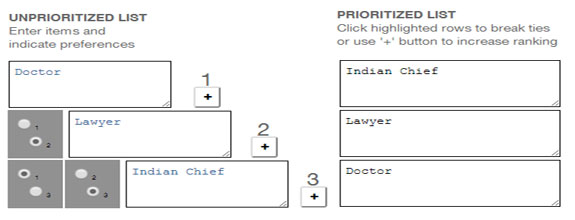
Richard Bolles' Prioritizing Grid
If you have a list of three or four items and you want to know how they rank in importance, it’s generally pretty easy. Most likely, you do it just by eyeballing the list.
But if your list contains five or more items, it’s probably not so easy, and the more items you have, the more complicated it gets.
For this reason, Richard Bolles, author of the perennial career bestseller What Color Is Your Parachute? created a tool called THE PRIORITIZING GRID to help work-searchers form “a picture of the job of [their] dreams.”
Ranking personal preferences related to work, interests, environments, and values helps them to focus their energy and keeps them from spinning in circles.
Bolles’ grid allows you to establish priorities using a “divide-and-conquer” approach in which you take each item in a list of preferences and compare it to every other item, working in pairs, one pair at a time.
The paper version of the Prioritizing Grid printed in What Color Is Your Parachute? can be a bit cumbersome, so I am, with the permission of Richard Bolles, offering a web version which is easier to use (see p. 170 in the Parachute 2010 edition.)
The electronic grid comes in two formats.
The first is fixed in size with ten items, just like the one printed in Parachute. It has detailed instructions, plus a couple of sample lists you can practice on to help you get started. If you haven’t used the grid before, you probably want to begin with this format.
The second format allows you to specify how many items you want to prioritize. Choose a number from the selection menu below, then click the button and a grid will appear with exactly the number of items you requested.
User Comments
“Thank you for this wonderful app. Having it online is priceless. I’m going to bookmark the page and share it with my friends.”
“It made the task much easier. Items came to the top of my list that I didn’t expect.”
“I have used the grid for years, ever since finding it in Parachute. I’ve always done it on paper, but now the calculations are done for me.”
“It is so nice to be able to type everything in, and then have it automatically sort and then neatly print out. Thank you again for your generosity.”
“I have used this grid for, oh, maybe a couple of decades, since I found it in one of Bolles’ early books. Wow. I love it. I use it every time I have to make a decision that is extra tough for me when choosing between several things on any topic, not just job search. I have always done the grid by hand on paper, so I am looking forward to using the form here. Thank you, Thank you, Thank you!!!”
“It saved me so much time!”
“I’ve just used it for a very important job that involved ranking fifteen items and it worked brilliantly.”
“You gave good, clear instructions, and it worked perfectly!”
“Thanks for helping the world with this.”
Prioritizing Grid Feedback Form
If you like the Prioritizing Grid and find it useful, please tell your friends/colleagues. I also welcome feedback on how to make it better. If you have ideas or want to comment, please use the form below to send me a message (view my privacy policy).
Powered by Fast Secure Contact Form